A library that finds its own connections.
Every paper, book, and document you import lives in a single, searchable shelf — local-first, indexed automatically, ready for both keyword and semantic queries.
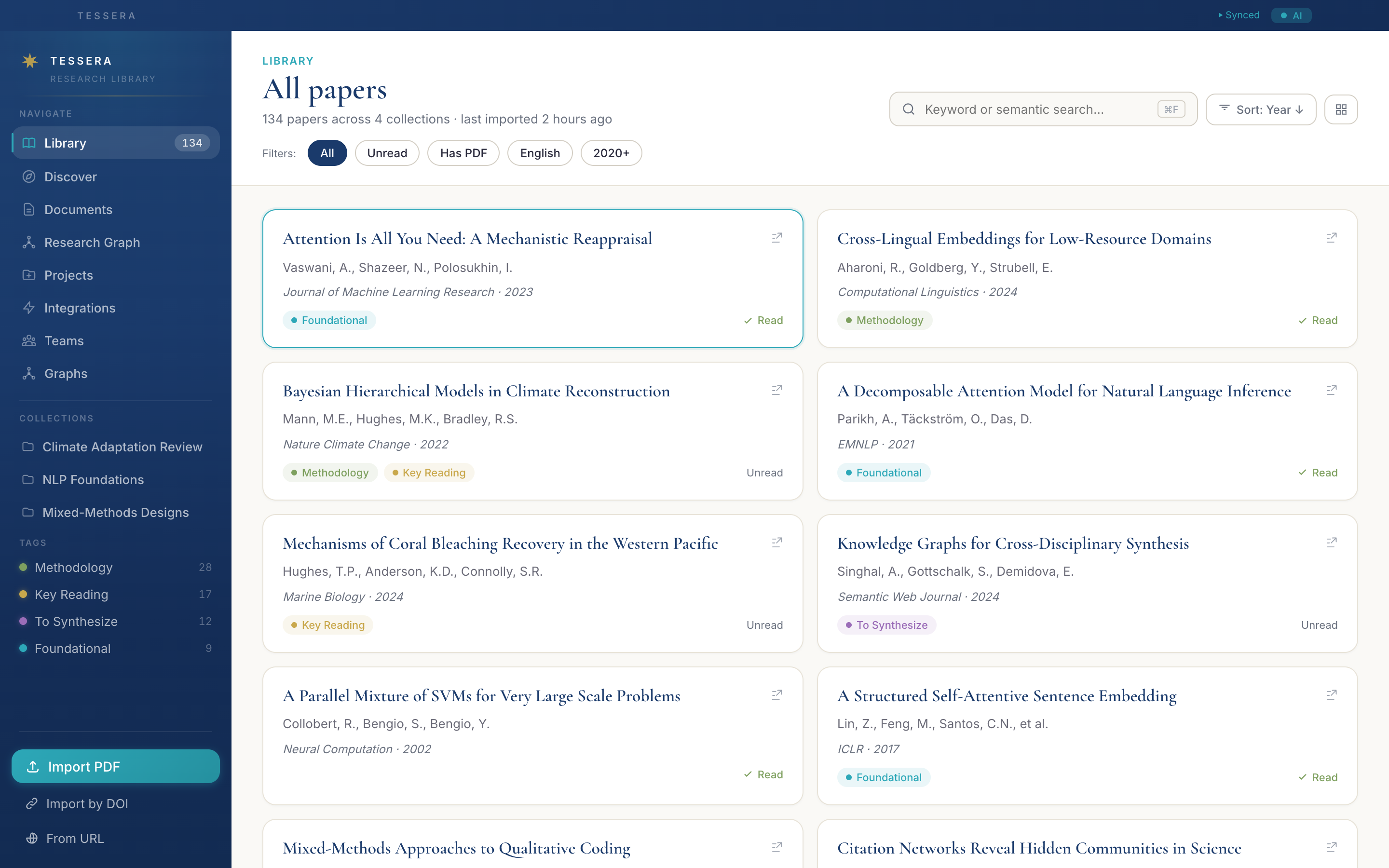
- Keyword + semantic searchSearch the title and abstract, or query passages by meaning using a local Transformers.js model — no API key, works offline.
- Collections + tagsGroup papers into colored collections (a thesis chapter, a reading list) and use multi-color tags to slice across them.
- Sort and filterYear, citation count, recency, language, read status, has-PDF — all instant, all local.
- Bulk find PDFsFor papers in your library that don't have files attached, Tessera will look up open-access copies by DOI.
- Drag-and-drop importDrop PDFs or EPUBs anywhere in the window. Folders too — the indexer queues each file and extracts metadata in the background.
- Library-wide BibTeX exportOne click exports your entire library as a .bib file, ready to paste into a LaTeX manuscript.
Search nine academic databases at once.
Tessera queries OpenAlex, Semantic Scholar, CrossRef, arXiv, PubMed, Europe PMC, CORE, DBLP, and BASE in parallel, dedupes by DOI, and tells you which results you've already imported.
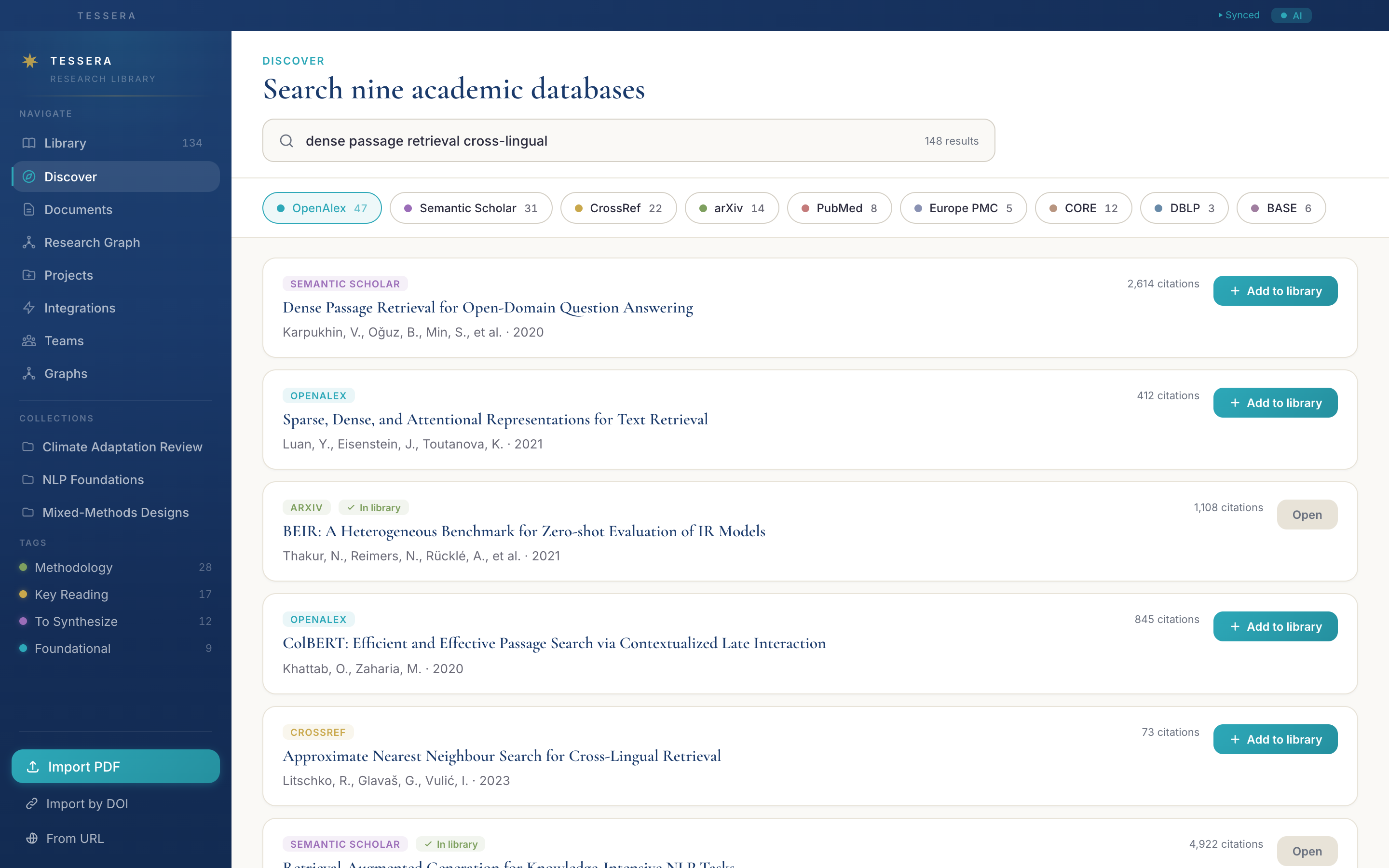
- Nine databases, one queryEach source's results stream in as they arrive; click a source pill to focus on just that provider.
- In-library indicatorPapers you've already imported are flagged with a teal check — no accidental duplicates.
- One-click import"Add to library" pulls metadata, downloads an open-access PDF if available, and queues citation parsing.
- Cloud suggestionsWhen you're signed in, the cloud surfaces papers heavily cited by your library that you haven't imported yet, plus trending and similar-researcher suggestions.
- Citation contextEvery result carries its citation count and venue so you can prioritise without leaving the search view.
Where reading turns into writing.
Tessera ships with a full TipTap-based editor that knows about your library: cite a paper inline, transclude a passage you highlighted yesterday, leave a comment, ship a version history along with the manuscript.
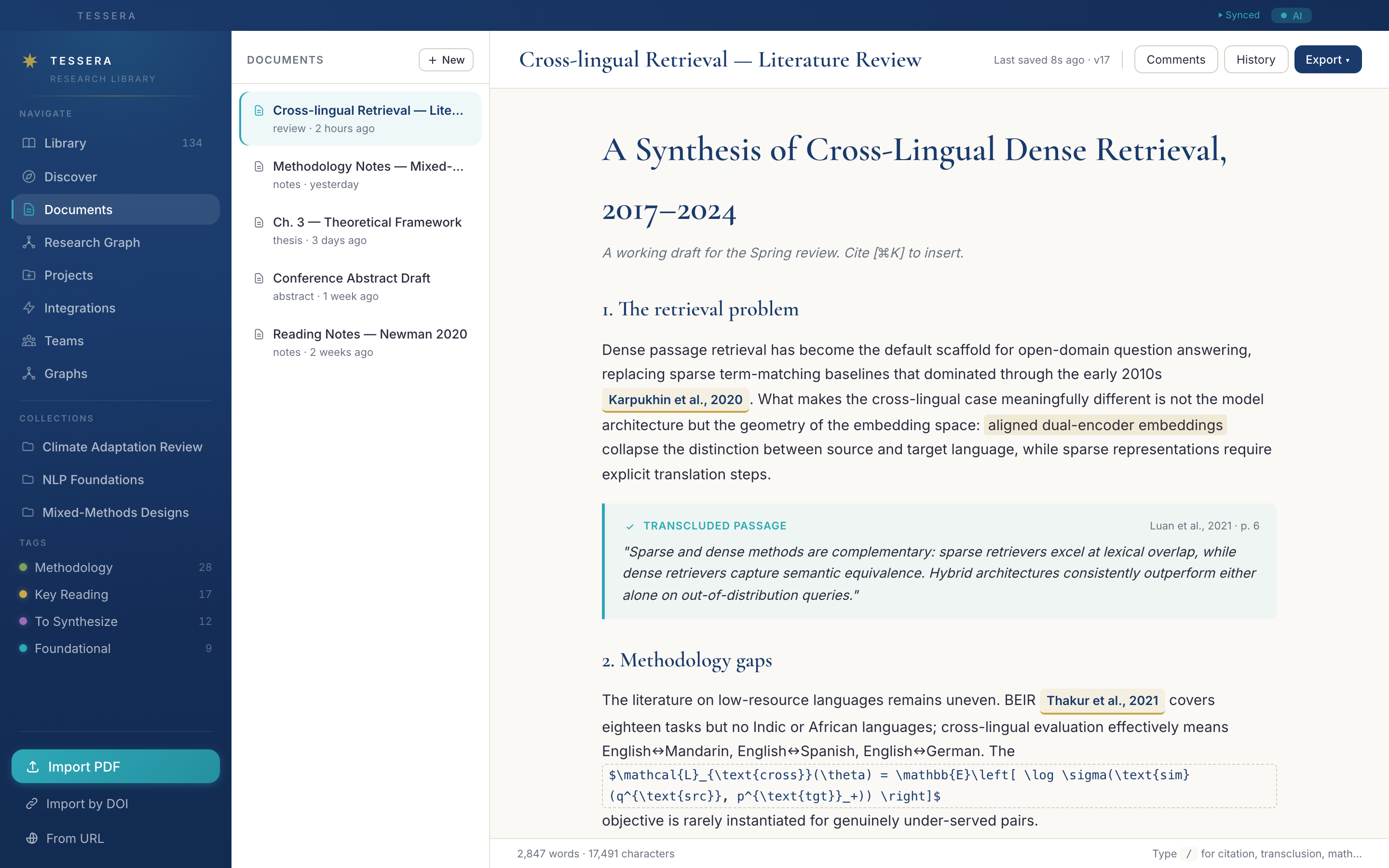
- Inline citations from your libraryType / and pick a paper. Tessera renders the citation in your default style and tracks which papers a document depends on.
- Transcluded passagesHighlights you saved while reading can be embedded as live block quotes — re-edit the source highlight and the transclusion updates automatically.
- Threaded commentsHighlight a paragraph, leave a comment, reply, resolve. Useful for advisor-student feedback or self-reviews.
- Version historyManual save points with optional messages, plus continuous autosave. Restore any prior version with one click.
- KaTeX math, tables, codeInline $math$ blocks, structured tables, syntax-highlighted code blocks — all standard, all keyboard-driven.
- Export to six formatsMarkdown, MDX, HTML, LaTeX, BibTeX, DOCX. Bibliography is auto-generated from inline citations.
- TemplatesStart from a literature-review skeleton, IMRaD draft, lab-notes template, or save your own.
Your library, as a network.
Tessera builds a living graph of every paper, document, project, passage, and concept in your library — with dual renderers (Canvas2D for clarity, Rust + WebGPU for ten-thousand-node libraries at sixty frames per second).
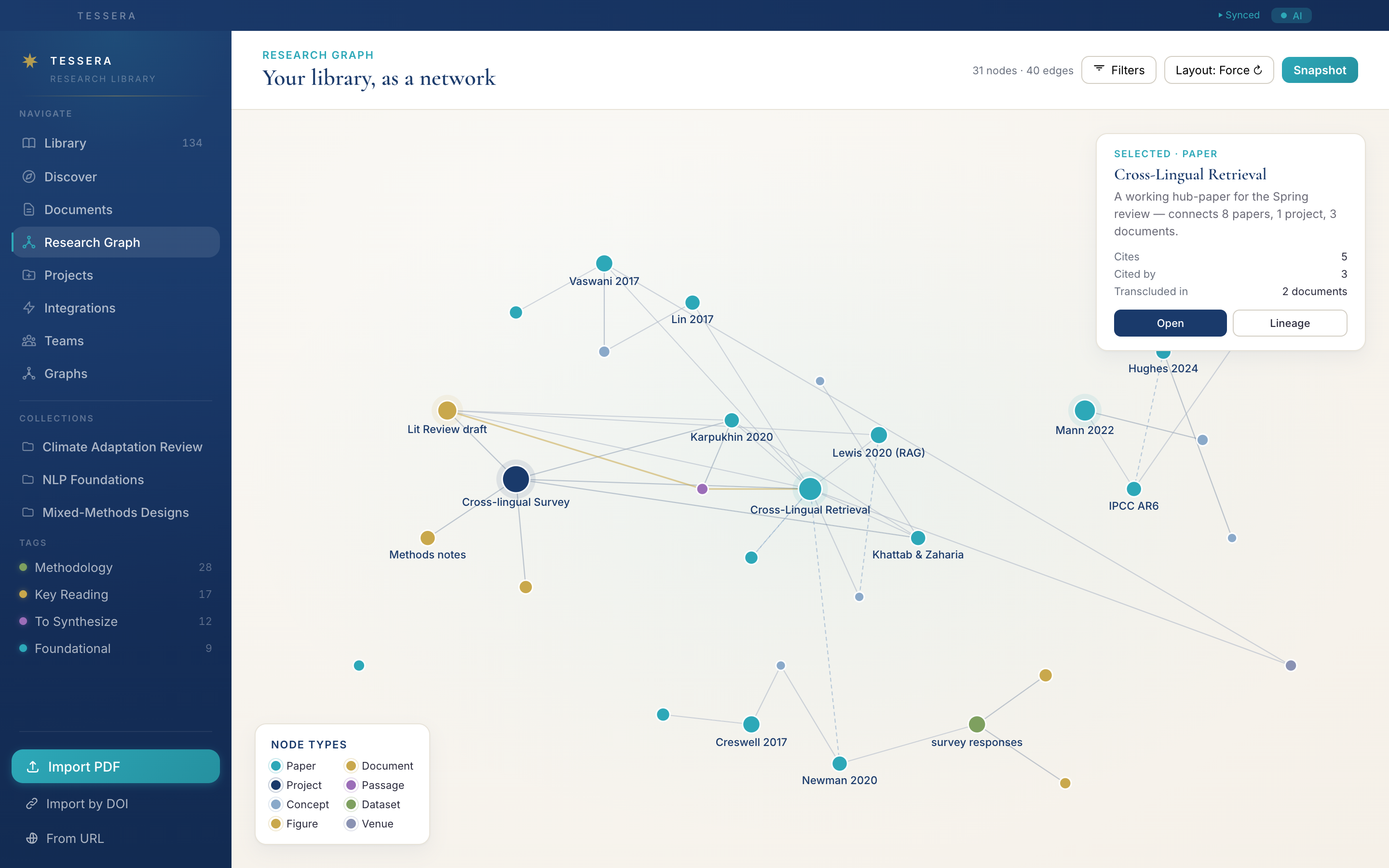
- Twelve node types, nine edge typesPapers, books, documents, projects, datasets, figures, passages, concepts, venues, conversations, external references, people — connected by cites, transcludes, similar-to, contains, mentions, anchored-in, annotates, authored-by, discusses.
- Two renderers, one modelSmall graphs (under ~1,000 nodes) render through Canvas2D for crisp rendering. Large graphs route through a Rust/WebGPU engine compiled to WASM, with a WebGL2 fallback.
- Lineage modeTrace the citation chain forward and backward from any paper using a BFS traversal — see which foundational papers feed into a recent result, or which descendants pick up a method.
- Cluster detectionBuilt-in community detection surfaces the natural neighbourhoods in your library — useful for finding gaps as much as themes.
- Filter overlaysToggle node types and edge types live; the layout reacts smoothly without a re-simulation.
- Snapshot to publishCapture the current view as a published graph — shareable inside a team or, with consensus, made public at /u/:username/:slug.
Read closely, annotate precisely.
Tessera's PDF viewer is built around long-form reading: five highlight colors with semantics, in-text citation marker detection, passage anchoring, full-text search, and a tabbed sidepane that keeps your annotations, citations, and bookmarks one click away.
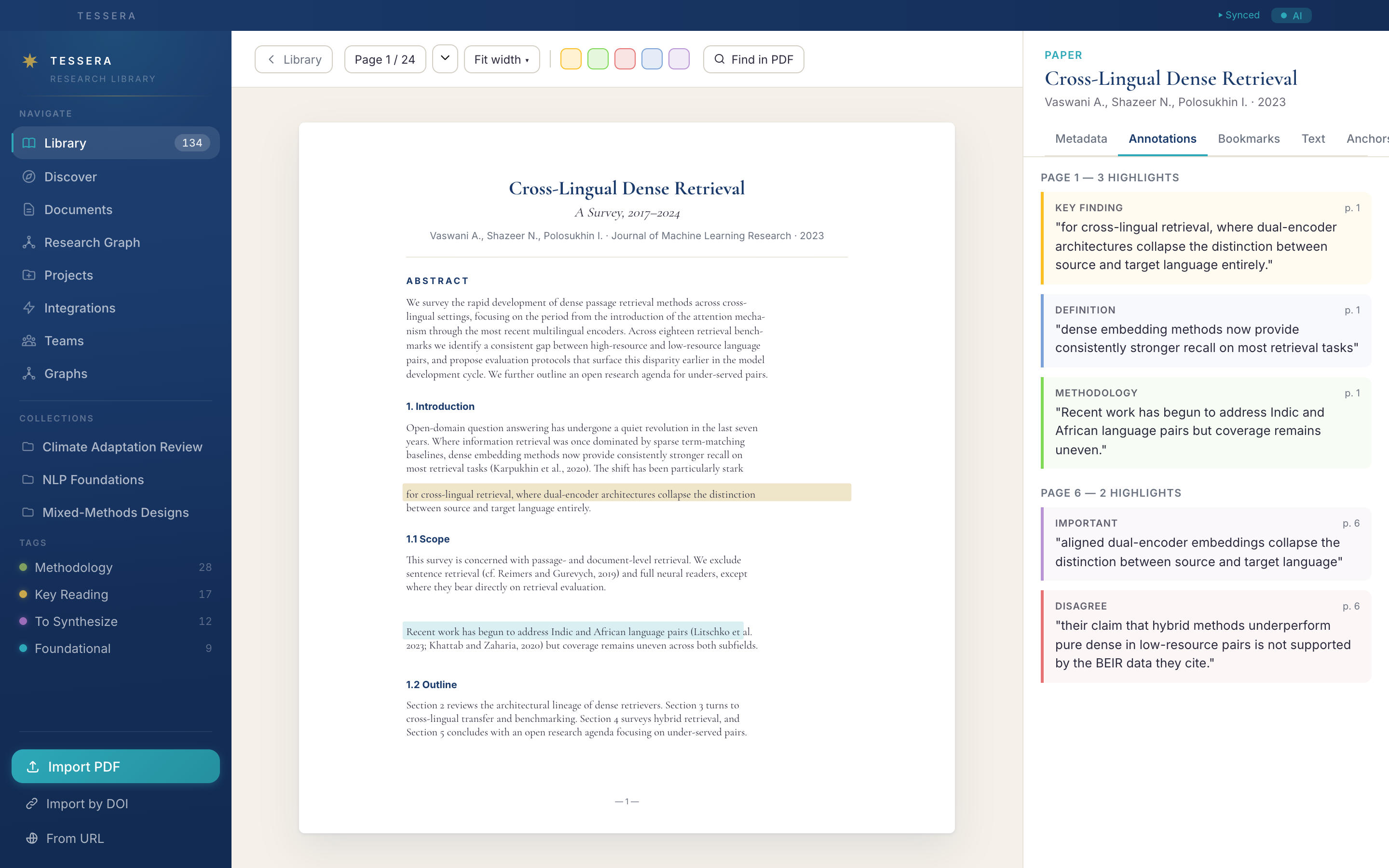
- Five-color semantic highlightsKey finding, methodology, disagreement, definition, important — picked up by export so reviewers know what each color meant.
- Citation marker detectionTessera detects in-text citation markers ([12], (Smith 2020)) and links them to the matched paper in your library — bidirectional cited-by relationships emerge automatically.
- Passage anchorsSave text fragments as named passages. They become first-class graph nodes — transcludable in documents, citeable, queryable by similarity.
- Bookmarks + reading statusMark pages, mark papers as read, queue follow-ups. Reading status is surfaced as a filter on the library.
- Full-text searchCtrl+F over the whole PDF with match counter and prev/next navigation.
- Reference list parsingReferences at the back of a PDF are parsed into structured rows — match them against your library or import the missing ones.
- EPUB supportSame selection, highlighting, and passage workflow for EPUB books, with chapter navigation and table-of-contents.
A workspace per inquiry.
Projects bundle a topic's sources, documents, files, datasets, codebooks, figures, and references into a single hierarchical view — sub-projects, color-coded, with their own bibliographies.
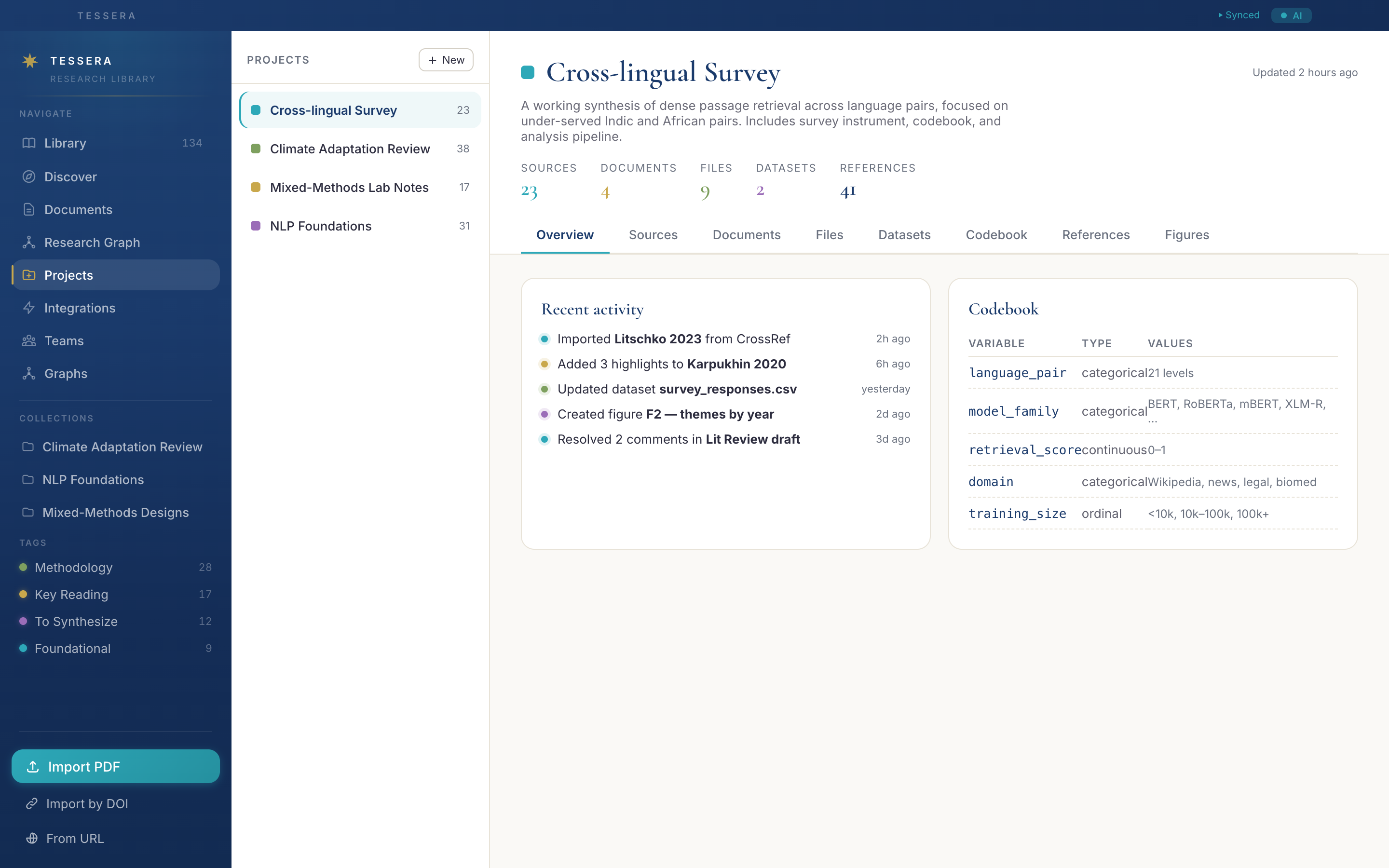
- Sources, documents, filesLink papers from the library, add manuscripts, drop in any non-library files (CSVs, images, PDFs).
- Datasets and codebooksBuilt-in spreadsheet editor with type-checked columns, copy-paste from TSV, CSV/XLSX export, and a structured codebook for variables.
- Figure builderA four-step wizard turns a dataset into a publication-grade chart — bar, histogram, box plot, scatter, line, pie, grouped bar, heat map, Likert, frequency table.
- Project bibliographyGenerate a BibTeX or formatted bibliography scoped to just this project's sources.
- Sub-projectsNest projects to mirror chapter and section structure — useful for thesis work and longitudinal lab notebooks.
Connect to the rest of your toolchain.
Tessera plays nicely with the rest of the academic stack — Zotero (bidirectional sync), ORCID, watch folders, and the Model Context Protocol for AI assistants.
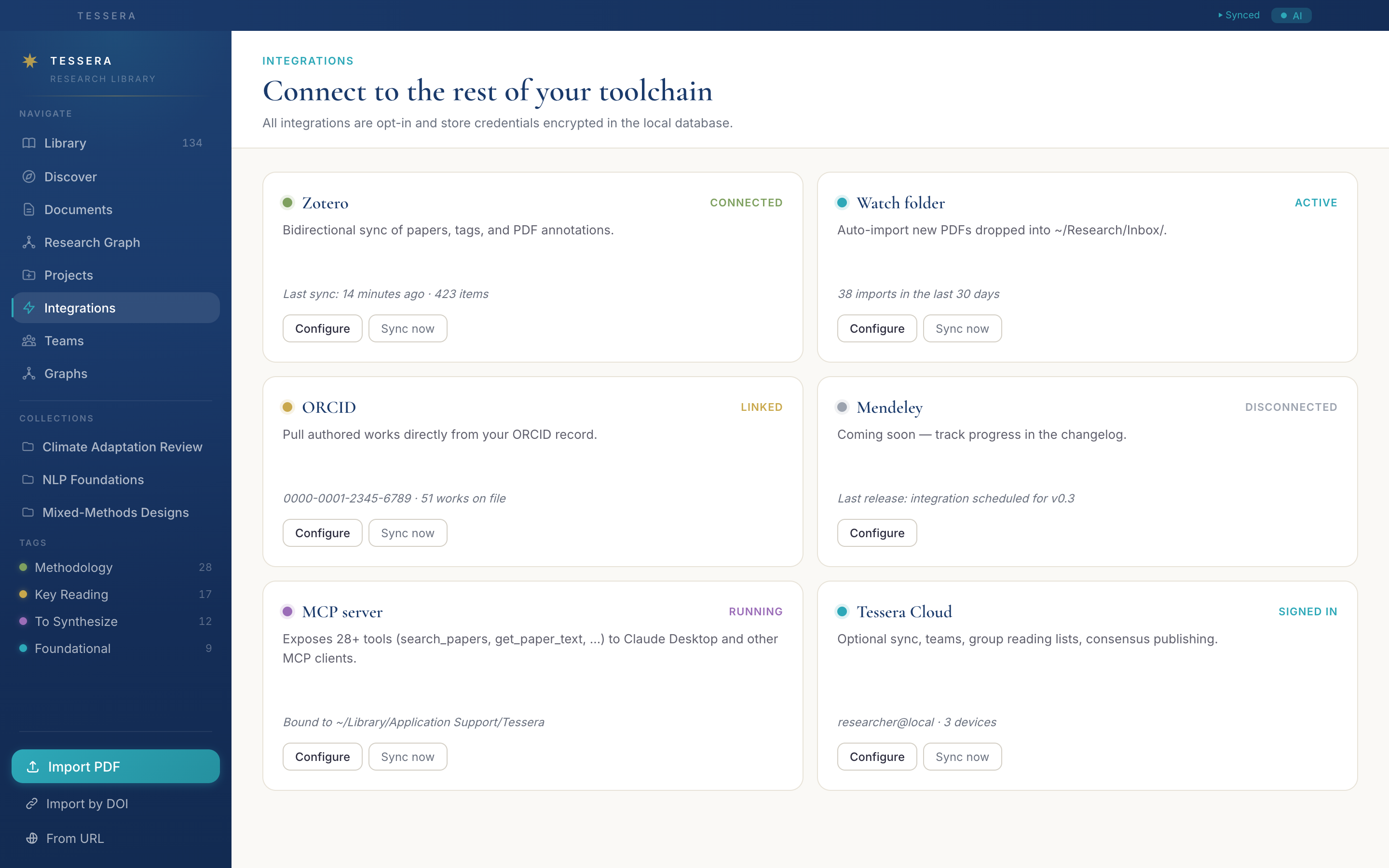
- Zotero bidirectional syncPull papers, tags, and PDF annotations from a Zotero library; push your Tessera changes back. Conflicts surface in a dedicated resolver.
- Watch foldersPoint Tessera at a directory and any new PDF or EPUB dropped in is auto-imported, with optional auto-tagging.
- ORCID importPaste an ORCID iD and Tessera fetches the authored-works list and imports any papers you don't have.
- MCP serverTessera ships a standalone MCP server exposing 28+ tools (search_papers, get_paper_text, format_citation, create_figure, …) to Claude Desktop and any other MCP-aware client.
- Cloud syncOptional, opt-in. Sync papers, annotations, tags, and reading lists across machines; use teams and consensus publishing for shared work.
Five ways to add a paper.
Drop a PDF, paste a DOI, paste a URL, point at a folder, or paste a list of DOIs. Each path runs through the same metadata extractor.
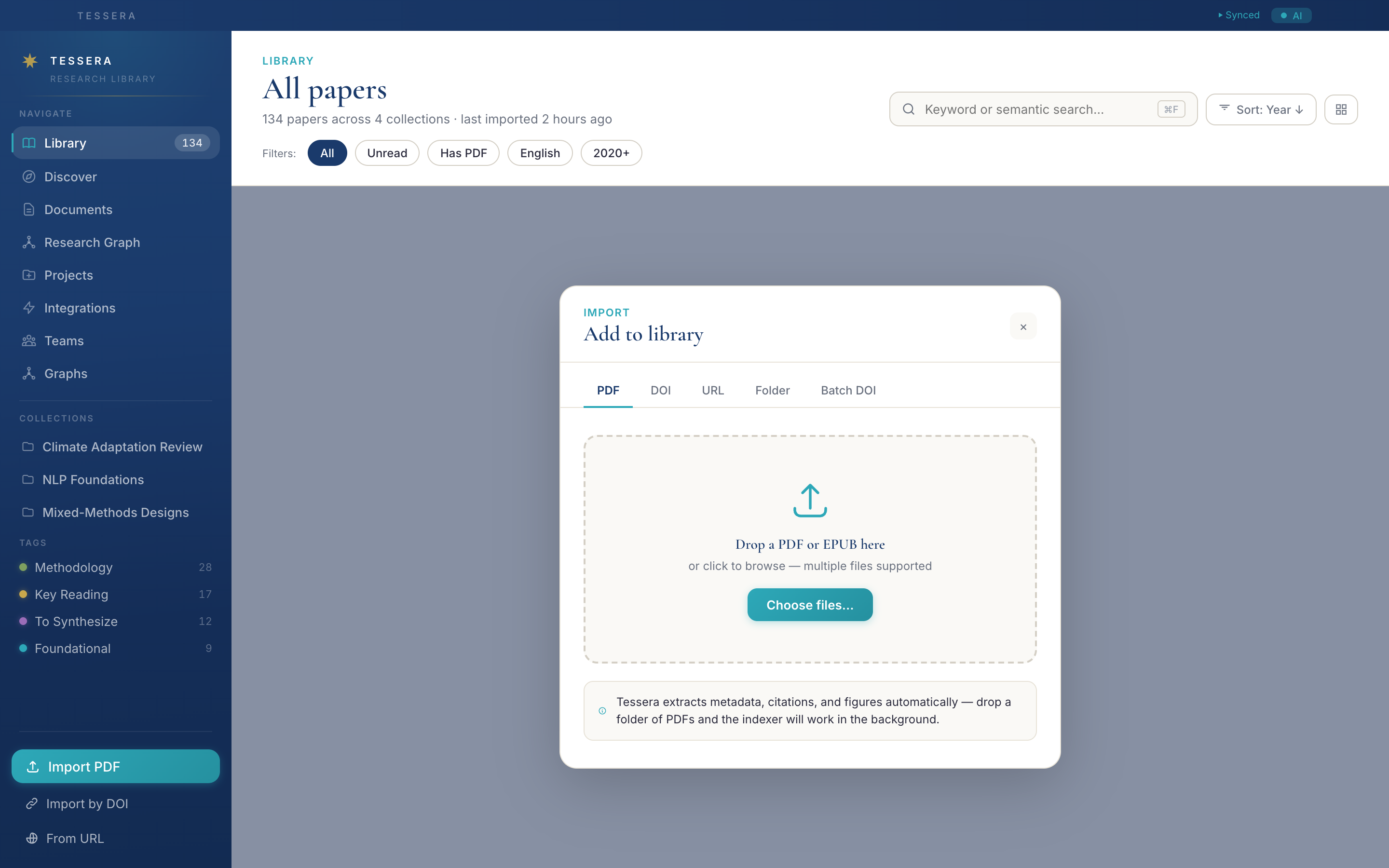
- PDFs and EPUBsSingle files or batches. Title, authors, year, and DOI are extracted from the file content; if a DOI is found, the metadata is verified against CrossRef.
- DOIsPaste a DOI or full DOI URL — Tessera fetches metadata and downloads an open-access PDF if available.
- URLsPaste an arXiv link, a publisher page, or any landing page; Tessera scrapes the metadata and tries to locate the PDF.
- FoldersRecursive import of every PDF and EPUB inside, with a live progress indicator.
- Batch DOIsPaste a newline-separated list and Tessera imports each one with a per-row progress indicator.
Knobs that respect your data.
Theme, language, citation style, embedding model, MCP server, AI assistant, cloud sync, federation — every setting is local-first and opt-in. Nothing leaves the machine until you say so.
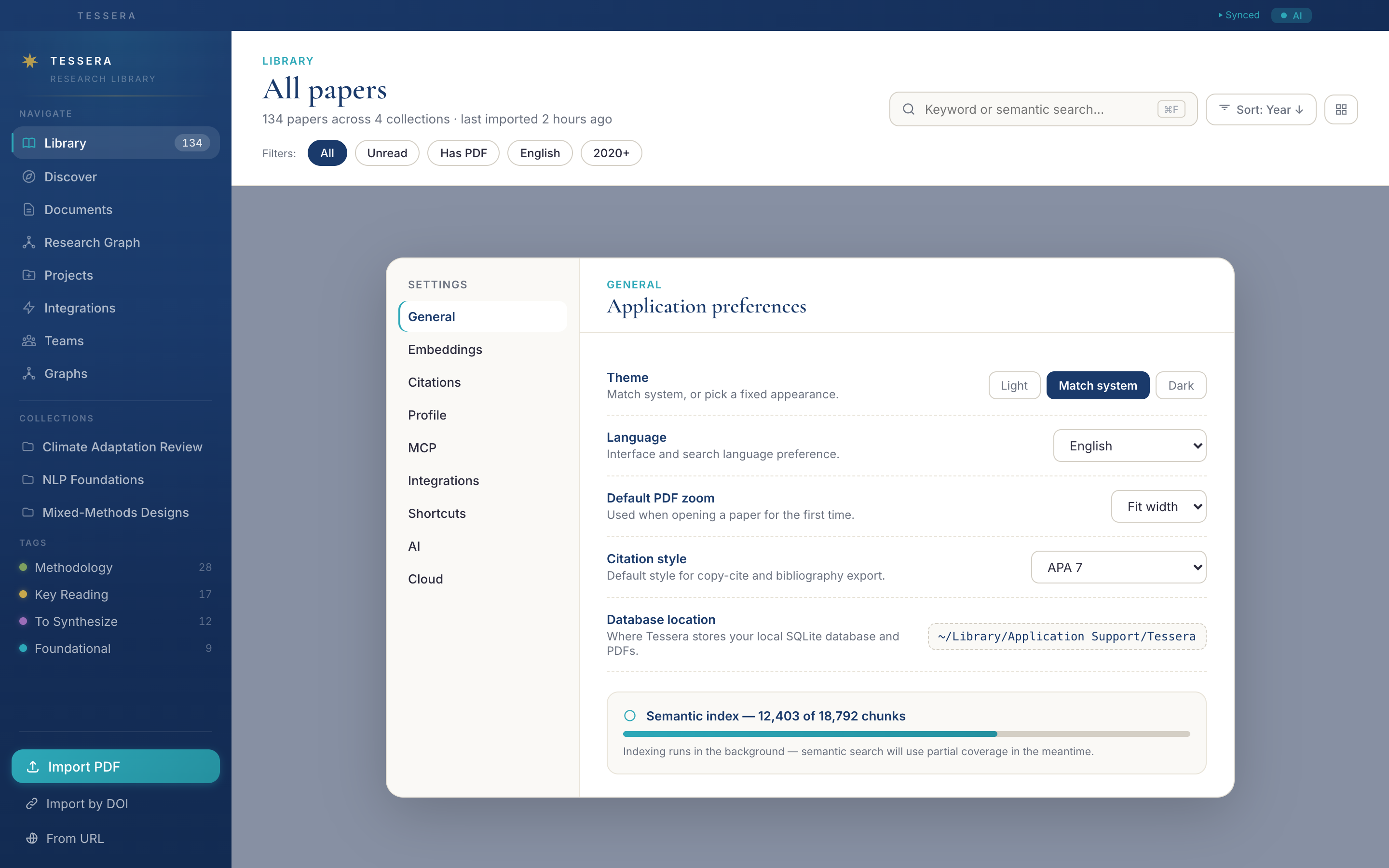
- Theme + languageMatch system, light, or dark. Interface available in English, Mandarin, Spanish, French, German, Japanese, Korean, Arabic, and Russian.
- EmbeddingsPick a Transformers.js model — small for speed, large for accuracy — and Tessera re-indexes your library in the background.
- CitationsAPA 7, MLA 9, Chicago author-date, IEEE, BibTeX, Vancouver. The default style is used by Cite menus, copy-citation, and bibliographies.
- MCPToggle the MCP server on; Tessera writes the absolute path you'll need for your Claude Desktop config.
- CloudSign in (email/password or Bluesky AT Proto), see your device registry, manage sync direction.
- FederationLibrary fingerprint (SHA-256 hashes of your DOIs, never plaintext) is used to find researchers with overlapping libraries — fully optional.
- ShortcutsA read-only reference for every keyboard shortcut Tessera supports.
Tessera as a tool for your AI assistant.
Tessera ships a standalone Model Context Protocol server that exposes 28+ tools to Claude Desktop and any other MCP-aware client. Your assistant can search the library, read paper text, list annotations, format citations, build figures from datasets, and more — all without your library leaving the machine.
- search_papers, list_papers, get_paperLibrary queries, by keyword, semantic similarity, or DOI.
- get_paper_text, get_passages, get_annotationsFull text, named passages, and your highlights — straight to the assistant.
- format_citation, format_bibliographySix citation styles, on demand.
- create_figure, get_dataset_preview, get_codebookProject datasets become assistant-readable; figure creation is a one-call tool.
- create_paper_from_doi, add_note, tag_paper, mark_readLibrary mutations are explicit and audited — your assistant can ask Tessera to import or annotate, but only when you authorise it.
- Team MCP (cloud)Signed in?
/api/mcp/team/:groupIdexposes your team's merged library to LLMs over JSON-RPC. Non-members get a 403.
Shortcuts.
A small, deliberate set — every shortcut also has a UI affordance, so you never need to memorize them.
| ⌘N | New document |
| ⌘O | Open import modal |
| ⌘F | Focus search bar |
| ⌘S | Save document version |
| ⌘1 | Switch to Library |
| ⌘2 | Switch to Discover |
| ⌘3 | Switch to Documents |
| ⌘, | Open Settings |
| ? | Show keyboard help |
Ready to start?
The desktop app is the home base — your library lives on your machine, syncs through the cloud at your discretion.
Download for desktop Browse the source